




Most programmatic SEO projects fail before a single page goes live. They fail in the kickoff meeting, the moment someone asks: how many pages can we publish?
It sounds like ambition. In practice, it's how a site ends up with 5,000 new URLs, a Search Console report full of "Crawled - currently not indexed," and a marketing team wondering where the traffic went.
The better question is: what do we know that nobody else does?
Pages are the output. Data is the asset.
What Programmatic SEO Actually Is
Programmatic SEO is a system with three parts: one template, one structured dataset, and one search pattern that repeats. The template sets the layout. The dataset fills it. The search pattern decides which pages deserve to exist.
Zapier is the classic example. Search "Gmail integrations" and you land on a Zapier page listing the apps Gmail connects with, popular workflows, and every trigger and action available. Swap Gmail for any of the 9,000+ apps Zapier supports and the same template fills with different, accurate data. Wise does the same with currency pairs. Every converter page carries the live mid-market rate, a historical chart, and 30- and 90-day highs and lows.
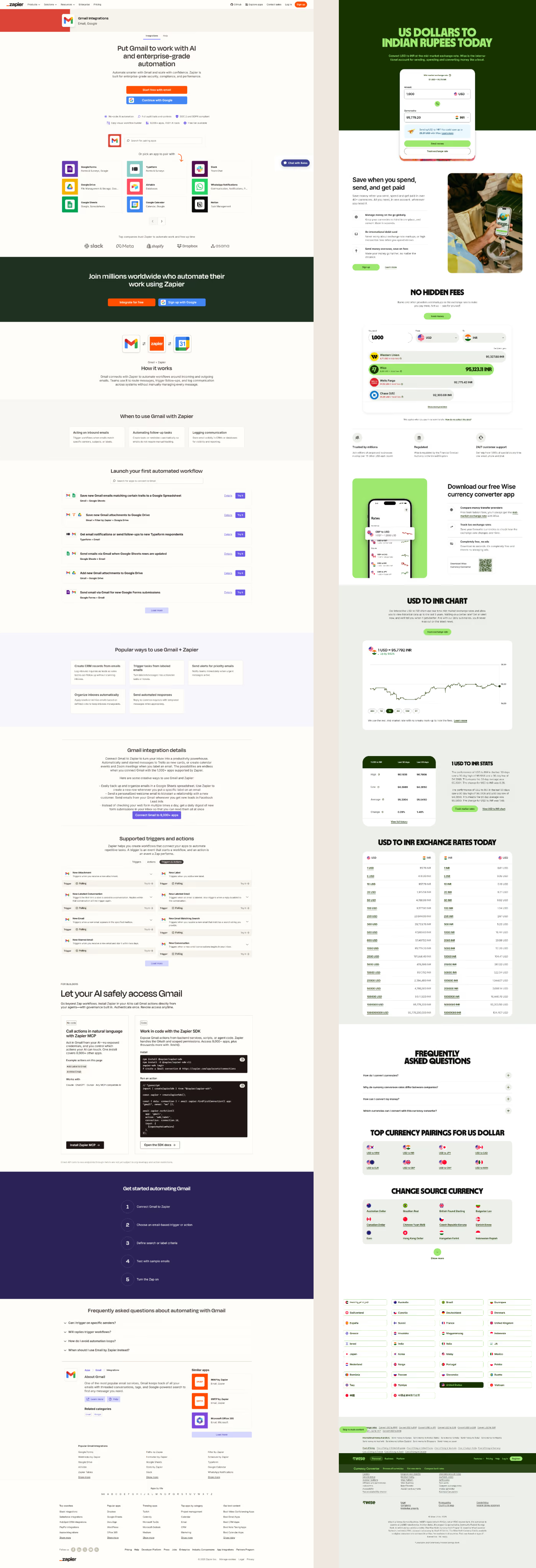
Neither company won because of page count. They won because every page holds what the searcher came for, and they are the source of it.
There are two ways to approach this, and the difference decides everything that follows.
Page-first starts with a keyword list and a template, then looks for words to fill the gaps.
Row-first starts with a dataset, then asks which searches it can answer better than anyone else.
Page-first builds a factory. Row-first builds an asset.
"It's painful to watch agencies, excited by what AI tools can produce, hand clients hundreds of thin pages where the only thing that changes is the keyword. Those pages don't build visibility. They erode it. And every one of them makes programmatic SEO look like a shortcut, when done properly it's one of the most durable growth strategies a B2B site can have." - Karina Demirkilic, founder of Rapid Fire
Four Ways the Page Factory Mindset Shows Up
Most confusion about programmatic SEO comes from one habit: treating the page as the product.
"More pages means more traffic"
In 2023, a marketer went viral for what he called an "SEO heist." He exported a competitor's sitemap, turned its URLs into article titles, and had AI write 1,800 articles for his client, a startup called Causal. By his count, it brought in 3.6 million total visits.
Then Google caught up. According to estimates reported by The Decoder, Causal's traffic fell from about 610,000 visits in early October 2023 to about 190,000 by mid-December. That's lower than where the site started before the campaign.
Volume without substance isn't a strategy. It's a countdown.
"Google penalizes programmatic pages"
It doesn't. Google penalizes pages that exist only to rank.
Its spam policy defines scaled content abuse as "when many pages are generated for the primary purpose of manipulating search rankings and not helping users." When Google introduced that policy in March 2024, it was explicit that the method doesn't matter. The policy applies "whether automation, humans or a combination are involved."
So the test is purpose, not production. Zapier and Wise have run programmatic pages at enormous scale for years. At the same time, Google has already shipped four spam updates in 2026. The enforcement is real. It's aimed at empty pages, not at templates.
"AI can fill the pages for us"
AI writes sentences. It can't invent your data.
Google's own guidance on generative AI content warns that using these tools "to generate many pages without adding value for users" may violate the scaled content abuse policy. AI can help you describe a dataset, summarize it, or write the connecting copy between the numbers. It can't be the dataset.
"Swap the city name and you have a page system"
This is the most common version, and the one I push back on hardest.
"Web design Toronto." "Web design Denver." "Web design Austin." Same copy, same promises, a different city in the H1. Google has a name for this: doorway abuse. Its policy lists "having multiple domain names or pages targeted at specific regions or cities that funnel users to one page" as a direct example.
If the only thing that changes between two pages is the keyword, you don't have two pages. You have one page and a find-and-replace.
Row-First Thinking
Picture your programmatic project as a spreadsheet. Every row becomes a page. Every column becomes a section of that page.
Now apply what I call the row test: can you fill every column in this row with something true, specific, and useful to the person searching? If yes, the row earns a page. If not, it stays in the spreadsheet until it can.
This one test does more work than most SEO tools. It stops doorway pages before they're built. It shows you where your data is thin. And it forces the question most teams skip: where is this data coming from?
There are three answers, ranked by how hard they are for a competitor to copy:
- Proprietary data. Product usage, transaction records, customer outcomes. Only you have it.
- Operational data. Your integrations, inventory, pricing, feature matrix. Parts of it may be public, but you are the source of truth.
- Research data. Information you collected, cleaned, and structured yourself. Anyone could have done it. Nobody else did.
A competitor can copy your template in an afternoon. They can't copy your dataset.
What It Looks Like When the Data Leads
Three examples, one for each type of data.
Proprietary data: ImportGenius importer pages
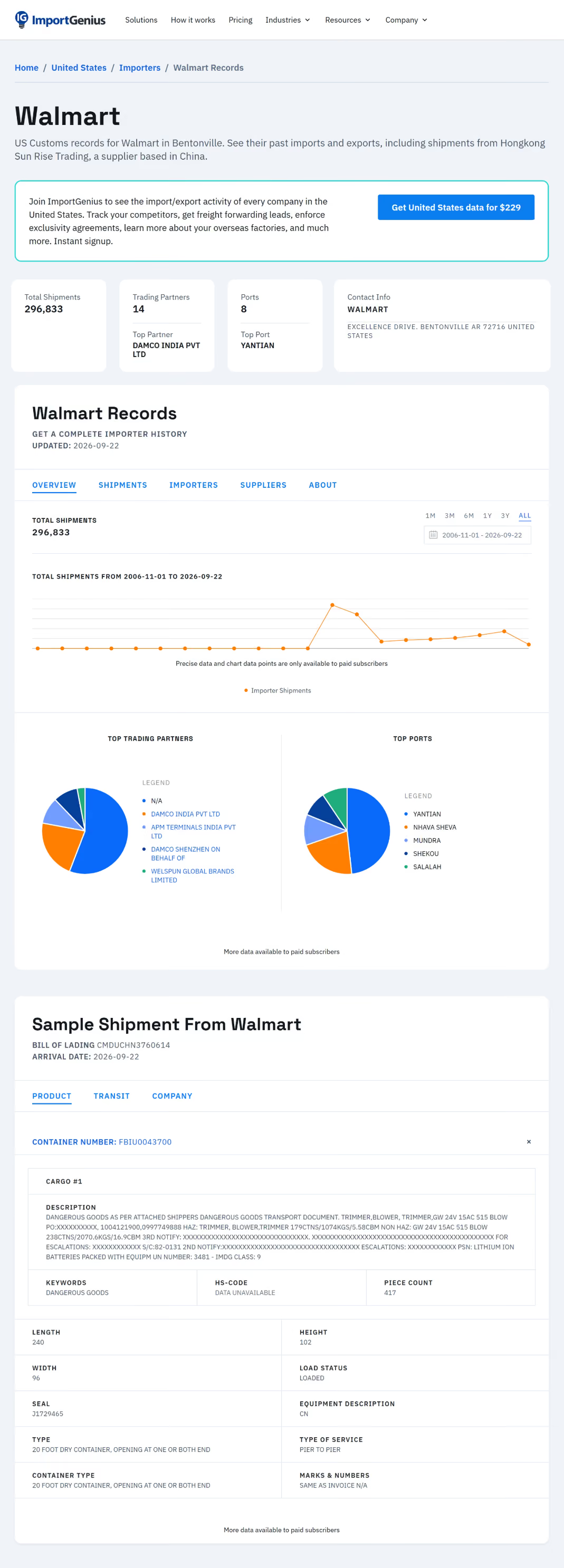
We manage the marketing website for ImportGenius, a trade data platform. Their importer pages aren't ours. They run on the product side, and they're one of the clearest examples of proprietary-data programmatic SEO I know.
Every importer gets a page built from customs records: total shipments, suppliers, ports, HS codes, and a sample shipment record. Swap the company name and every number on the page changes. The public view answers the searcher's question. The full history sits behind a subscription.
That last detail matters. These pages don't only bring in traffic. They work as a product demo that shows up in search results.
Operational data: event rental category pages
Event rental companies sit on a dataset most of them never think of as content: their inventory. Chiavari chairs, farm tables, linens, arches, lounge furniture. Every one of those categories is something a planner searches for, usually with a city attached.
When we integrate Goodshuffle Pro into a Webflow site, category pages are built as Webflow CMS pages. Each category gets its own indexable page with its own copy, structure, and internal links, while Goodshuffle Pro keeps the inventory and the wishlist in sync. Our Charm Décor House build shows how that sync works on a live site.
The row test applies here too. A category page with real items, real photos, and a clear path to a quote passes.

Research data: the World Dojo Index
Combatpit is the martial arts publication we run, and the World Dojo Index is its original research project.
So far as stage 1, we processed nearly 3,000 gym listings across six cities: Toronto, Sydney, Rome, Singapore, Denver, and Buenos Aires. Each gym was classified by the arts it teaches, then analyzed across seven parameters: density, most popular disciplines, most common combinations, least represented arts, immigrant community correlation, white space, and single versus multi-discipline structure.
Every city gets its own page from the same template. And because the data is real, every page says something different. Nobody else had this dataset because nobody else built it. Research data is the one kind of proprietary data any company can create. It just takes the work most teams won't do.
Readers can also vote on which city we add next. London currently leads. That's the audience telling us which row to fill next.

Building It in Webflow
Webflow's CMS maps cleanly onto row-first thinking. A collection is the dataset. The collection template page is the template. Each CMS item is a row.
A few rules we follow when building these systems:
- Design the fields before the page. Every column in the spreadsheet maps to a CMS field, and every field maps to a section. A section with no field behind it is filler.
- Hide what's empty. Use conditional visibility so a missing field removes its section instead of showing a blank block.
- Connect the rows. Reference and multi-reference fields turn a pile of pages into a structure: related integrations, neighboring categories, other cities. More on that in our guide to internal linking.
- Launch in batches. Publish 50 rows, watch indexing in Search Console for a few weeks, fix what's thin, then scale.
- Noindex the rows that fail. Keep them in the CMS and out of the index until the data is there.
On capacity: since the May 2026 pricing update, Webflow's Premium plan includes 20,000 CMS items per site. That covers most B2B programmatic systems.
Start With the Spreadsheet
Before anyone opens Webflow, open a spreadsheet. List the rows. Fill the columns. Run the row test.
If you can't fill the row, don't publish the page.
If the spreadsheet comes back full, you don't have a content project. You have an asset your competitors can't copy. If you're sitting on data and aren't sure whether it's a page system, let's look at it together.