




If you're planning to include videos on your website, you might be wondering what the best way to do it is and which platform makes the most sense for your goals.
There are several common options clients typically consider. Each serves a different purpose. Below is a practical breakdown to help you decide.
1. YouTube (Best for visibility and marketing growth)

If your strategy includes public marketing, audience growth, or discoverability, YouTube is usually the strongest option.
Why clients choose YouTube
- It's free and effectively unlimited.
- Videos load quickly worldwide (global CDN).
- It's very easy to embed on any website.
- It automatically optimizes video quality for different devices and connection speeds.
- Built-in captions and accessibility tools.
- Videos can appear in search results (if public).
Things to consider
- Ads may appear (unless videos are unlisted or viewers use ad blockers).
- YouTube branding is always visible.
- Recommended videos can sometimes distract viewers.
- Privacy controls are more limited than Vimeo.
If growing your YouTube presence is part of your marketing strategy, we recommend keeping all videos there for consistency and reach.
How to embed your video
Step 1: Go to your YouTube video → Click Share → Embed
Step 2: Copy the iframe code and paste it into a Webflow embed element.
2. Vimeo (Best for a polished, controlled experience)

Vimeo is often chosen by companies that want a more refined presentation and stronger privacy controls.
Why clients choose Vimeo
- Clean, professional player
- No ads
- Strong privacy controls (password protection, domain restrictions)
- More control over player appearance and behavior
- Ability to disable post-video recommendations
Things to consider
- Free plan is limited
- Business use usually requires a paid subscription
- Smaller built-in audience than YouTube
- Upload limits depend on your plan
Important note about embedding
If you use Vimeo, make sure your domain is added under:
Video Settings → Privacy → Where can this video be embedded?
If your domain is not listed, the video may not display properly on your site.
3. Flowdrive (Best for Webflow sites with bandwidth concerns)
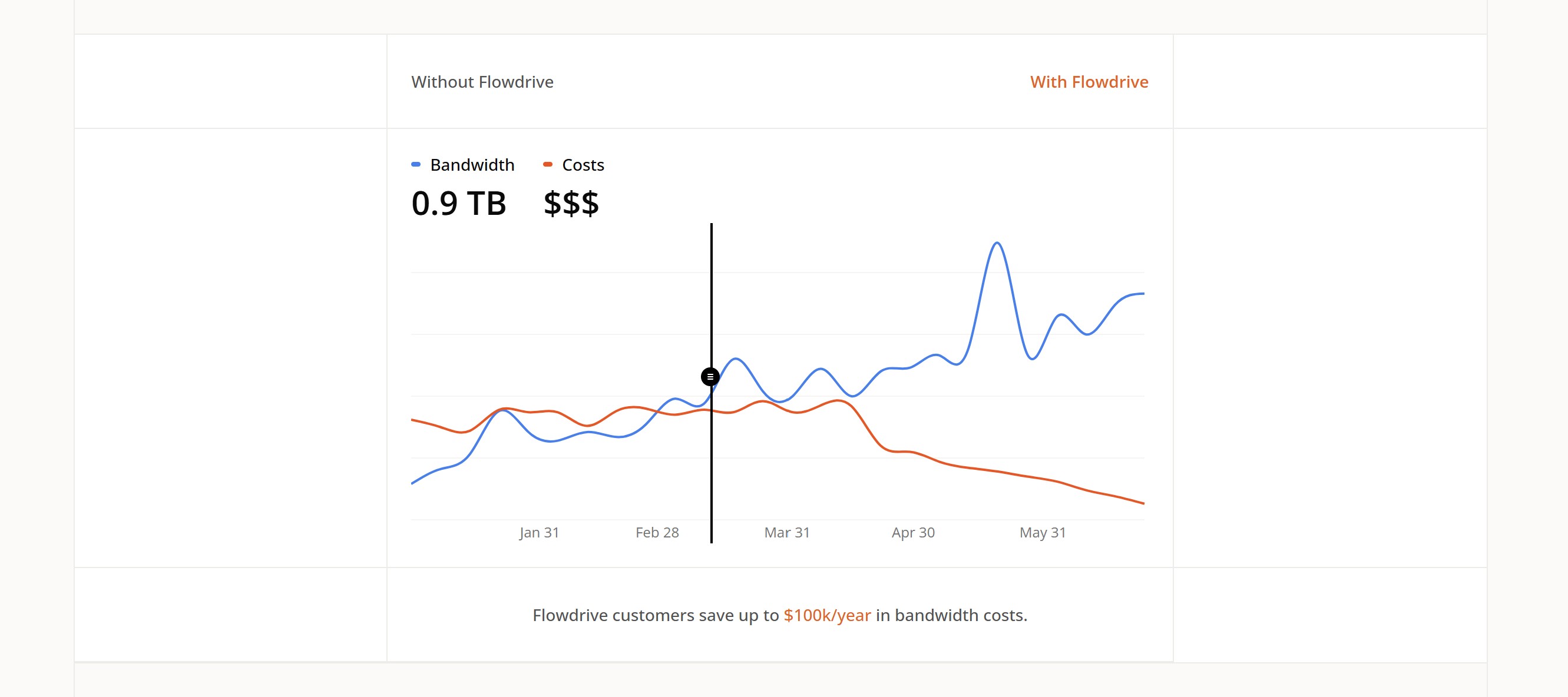
Flowdrive is a video and file hosting platform built specifically for Webflow. It was designed to solve a problem that comes up frequently on media-heavy sites: Webflow's bandwidth limits can lead to unexpected overage charges as traffic grows.
Why clients choose Flowdrive
- Unlimited video and file hosting with no bandwidth charges
- Adaptive streaming for smooth, buffer-free playback on any device or connection speed
- Media delivered through your own domain (no third-party branding)
- Gated access and password protection without writing code
- Easy migration from Vimeo, Dropbox, or other platforms
- Built specifically for Webflow, integrates cleanly without custom development
Things to consider
- Paid platform (no meaningful free tier)
- Primarily designed for Webflow — less relevant for other platforms
- Smaller ecosystem than YouTube or Vimeo
When Flowdrive is the right choice
If your site hosts a lot of video content and you're concerned about Webflow bandwidth costs, or if you want branded media delivery without the complexity of AWS, Flowdrive is worth considering. It sits in a useful middle ground between Vimeo's polish and AWS's flexibility without requiring developer setup.
4. Cloud storage (Google Drive or similar)
While technically possible, cloud storage platforms are not designed for streaming video on public websites.
When it may be appropriate
- Internal portals
- Temporary hosting
- Very low-traffic pages
Limitations
- Not optimized for streaming (buffering issues are common)
- No player customization
- No analytics or captions
- Bandwidth limits may cause videos to stop working
- Storage limits apply
- Moving files inside the drive can break embed links
For public-facing marketing websites, we do not recommend using Google Drive as your primary video host.
5. AWS S3 + CloudFront (Best for enterprise websites and custom platforms)
For companies with custom applications, membership portals, or high‑traffic websites, AWS S3 is a powerful option for hosting and delivering video. It's the same infrastructure used by major streaming platforms and enterprise systems.
Why clients choose AWS S3
- Extremely scalable and reliable
- No ads or third‑party branding
- Fine‑grained access control (private videos, signed URLs, expiring links)
- Works well for gated content, paid courses, or internal portals
- Can be paired with CloudFront, Amazon's global CDN, for fast worldwide delivery
- Integrates with AWS MediaConvert for adaptive streaming (HLS, DASH)
Things to consider
- Requires developer setup and configuration
- No built‑in video player (you embed your own or use a JS player like Video.js)
- More technical than YouTube or Vimeo
- Costs vary based on storage + bandwidth usage
When AWS S3 is the right choice
- Enterprise websites
- SaaS platforms or dashboards
- LMS or training portals
- Any site that needs secure, controlled video access
If your website needs full control, scalability, and security — especially for non‑public videos — AWS S3 is one of the strongest options available.
Final recommendation
For most marketing websites, YouTube is the most practical and scalable option.
If you prefer a more controlled, ad-free experience and are open to a paid plan, Vimeo is a strong alternative.
If you're on Webflow and bandwidth costs are a concern, Flowdrive offers a purpose-built solution that removes that friction without requiring developer work.
If you're unsure which option fits your goals, feel free to reach out to the Rapid Fire team and we'll guide you toward the best solution for your website.